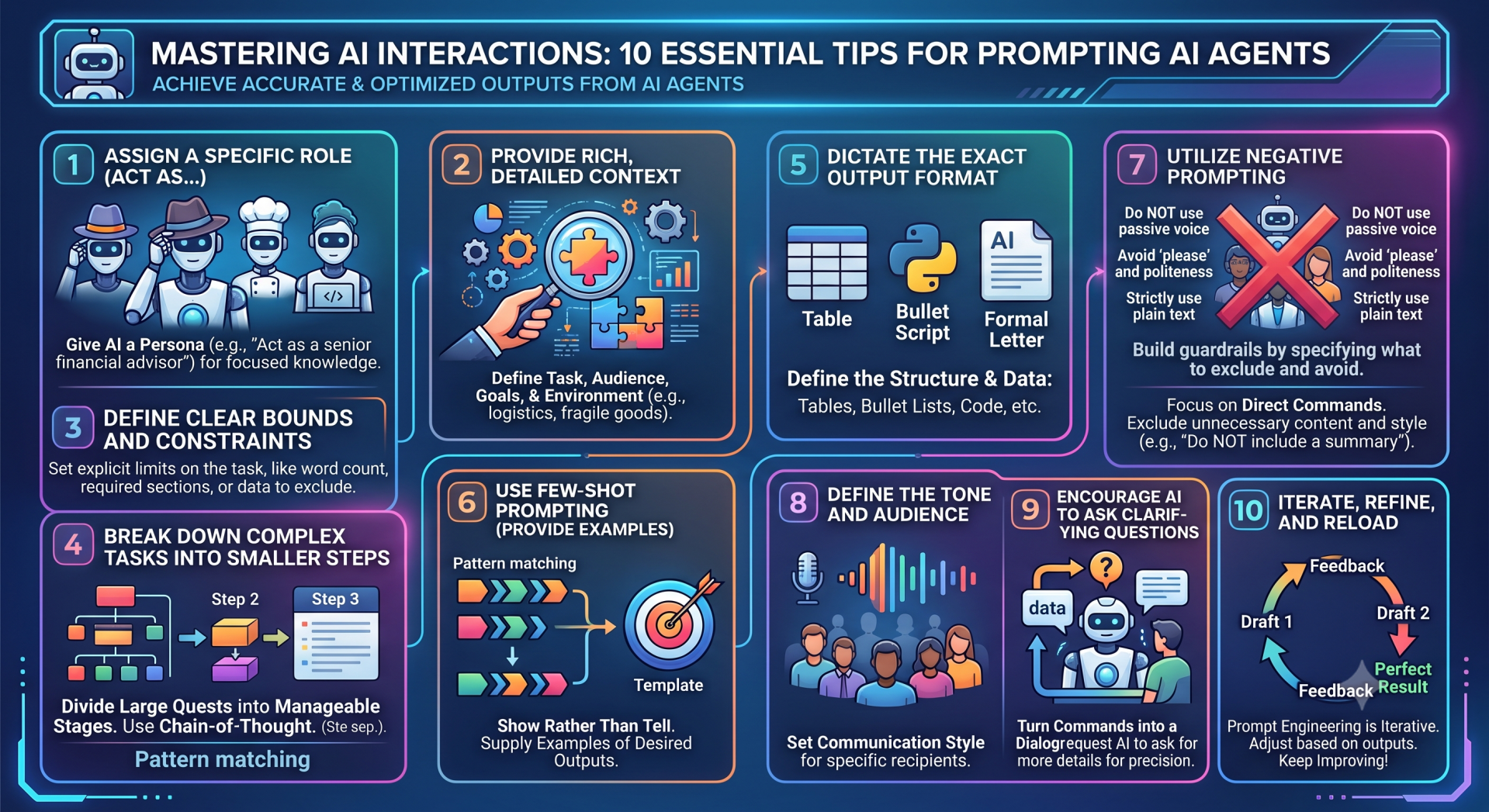
In the rapidly evolving landscape of digital technology, artificial intelligence has become an indispensable companion for everything from data analysis to creative writing. However, interacting with AI agents can sometimes feel frustrating—without the right words, focused intent, and precise execution, your efforts might result in generic or chaotic outputs.
Whether you are using AI for coding, researching, brainstorming, or drafting professional documents, the quality of the output you receive is directly and unbreakably tied to the quality of the input you provide. This input is known as a "prompt." A poorly structured prompt will yield a generic, unhelpful response, while a masterfully crafted prompt can unlock a wealth of highly specialized knowledge.
To help you command your AI tools with absolute precision, here is a comprehensive guide featuring ten essential tips for more accurate prompting.

1. Assign a Specific Role (Act As...)
The easiest and most immediate way to drastically improve an AI's output is to give it a persona. By assigning a role, you narrow down the vast ocean of data the AI draws from, forcing it to adopt the vocabulary, expertise, and professional perspective of that specific archetype.
-
Why this works: It sets the boundaries for the AI's "knowledge base" for that specific interaction, filtering out irrelevant information and ensuring a highly focused response.
Example: Instead of asking, "How do I manage my money?", you should prompt, "Act as a senior financial advisor. I have a budget of $50,000. Provide a detailed, conservative investment strategy to ensure long-term growth during an upcoming economic downturn."
2. Provide Rich, Detailed Context
An AI agent does not know you, your business, or your specific goals unless you explicitly state them. Think of the AI as a newly hired consultant—they need to know exactly what the job entails, who the target audience is, and what the environment looks like before they can be of any actual use to you.
-
Why this works: Context eliminates guesswork. When the AI understands the "why" behind your request, it can tailor the "how" much more effectively.
Example: "I am organizing a new supply chain route between our manufacturing plant and our primary distributors. We are currently facing delays due to port congestion, and our shipments contain fragile electronics. Given this situation, what are the best logistical strategies to minimize financial losses?"
3. Be Highly Specific with Your Instructions
Ambiguity is the ultimate enemy of a good prompt. If your instructions are vague, the AI is forced to make assumptions, which often leads to generic, hallucinatory, or entirely incorrect outputs. Use precise verbs and quantify your exact needs whenever possible.
-
Why this works: AI models thrive on explicit parameters. The less room you leave for interpretation, the closer the final output will be to your original vision.
Example: "Write a 300-word persuasive email convincing our software vendor to lower their licensing fees by 15%. Focus specifically on the long-term economic benefits of our continuous, exclusive partnership."


4. Break Down Complex Tasks into Smaller Steps
When faced with a massive, multi-faceted task, AI models can sometimes lose the plot, skip crucial details, or hallucinate fabricated information. Instead of throwing an entire project at the AI all at once, break it down into sequential, manageable steps using a chain-of-thought approach.
-
Why this works: It prevents the AI's context window from becoming overwhelmed and allows you to course-correct at each individual stage of the process.
Example: "We are planning a comprehensive marketing campaign. First, provide a list of the five most valuable customer demographics for luxury watches. Wait for my confirmation on the target demographic. Only then, generate a step-by-step rollout plan detailing social media strategies."
5. Dictate the Exact Output Format
You do not have to accept a massive wall of text if that is not what you need. AI agents are highly capable of formatting data exactly to your structural specifications. Whether you need a data table, a concise bulleted list, a Python script, or a strictly formatted formal letter, state it clearly in your prompt.
-
Why this works: It saves you the time and effort of having to manually reformat the information once the AI has provided it.
Example: "Create a comprehensive packing list for a week-long hiking expedition in the mountains. Format the output strictly as a table with three columns: Item Name, Quantity Needed, and Estimated Weight."
6. Use Few-Shot Prompting (Provide Examples)
Sometimes the best way to explain exactly what you want is to show rather than tell. Providing one or two examples of the desired output within your prompt—a technique known as "few-shot prompting"—sets a rigid structural template for the AI to follow, ensuring the tone and formatting perfectly match your expectations.
-
Why this works: Examples act as a cognitive anchor for the AI, demonstrating the exact pattern of logic or tone you want it to replicate.
Example: "Translate these casual phrases into highly formal business language. Input: 'Leave me alone.' Output: 'Please direct all future inquiries to my assistant.' Input: 'I need a favor.' Output: 'I am writing to request your assistance with an urgent matter.' Now translate: 'Let's make a deal.'"
7. Utilize Negative Prompting (State What to Avoid)
Knowing what you do not want is often just as important as knowing what you do want. Explicitly telling the AI to avoid certain words, clichés, formatting styles, or specific strategies can save you hours of editing and actively steer the model away from predictable, lazy responses.
-
Why this works: Negative constraints act as guardrails, keeping the AI focused on creative or alternative solutions by blocking off the most obvious pathways.
Example: "Design a workout routine for a beginner. You must completely avoid any suggestions related to heavy weightlifting. Do not include barbells, squat racks, or high-impact plyometrics in your recommendations. Focus entirely on bodyweight exercises and gentle cardio."
8. Define the Tone and Audience
A message written for a seasoned academic will look vastly different from one written for a middle school classroom. By defining your target audience and the desired tone of voice, you ensure that the AI's vocabulary, pacing, and sentence structure will resonate perfectly with the intended readers.
-
Why this works: It contextualizes the delivery of the information, ensuring the output is not just factually accurate, but also socially and contextually appropriate.
Example: "Write a short, engaging recruiting poster for a new tech startup. The audience consists of young, ambitious software engineers looking to disrupt the industry. The tone should be energetic, welcoming, and highly motivational."
9. Encourage the AI to Ask Clarifying Questions
You do not always have to do all the heavy lifting yourself. If you are unsure of exactly what parameters the AI needs to give you the absolute best answer, simply ask the model to ask you questions first. Sometimes you need to be probed for details before you can uncover the ultimate solution.
-
Why this works: It turns a one-sided command into a collaborative dialogue, allowing the AI to help you build the perfect prompt based on its own requirements.
Example: "I want to write a comprehensive, 10-page guide on securing an Ubuntu server. Before you generate the guide or an outline, ask me three clarifying questions about my current skill level, the specific version of Ubuntu I am using, and the main purpose of the server."
10. Iterate, Refine, and Reload
Your very first prompt will rarely yield a perfect result on the first try. Prompt engineering is a highly iterative process. If the AI misses the mark, do not start over from scratch or give up. Instead, provide corrective feedback in your next prompt, gently guiding the model back onto the correct path.
-
Why this works: AI models maintain context within a conversational thread. You can build upon previous outputs, tweaking and sculpting the text until it is exactly what you need.
Example: "That marketing email draft was good, but it sounded a bit too dry and corporate. Rewrite the previous response, but this time make it sound much more urgent and exciting, emphasizing that this is a limited-time offer that ends at midnight."
Conclusion
Mastering the intricate art of prompting takes time, patience, and plenty of experimentation. By defining specific roles, providing rich contextual backgrounds, and dictating exactly how you want your information delivered, you can effectively transform your AI agent from a basic text generator into a powerful, highly specialized tool. Keep these ten essential tips in mind, and you will be perfectly equipped to tackle any complex task.

Add comment
Comments